
Choosing the right model for each AI task with User Insights
Learn how AI Gateway User Insights classifies tasks, finds model overuse, attributes spend, detects anomalies, and supports quality-gated routing decisions.
Learn how AI Gateway User Insights classifies tasks, finds model overuse, attributes spend, detects anomalies, and supports quality-gated routing decisions.
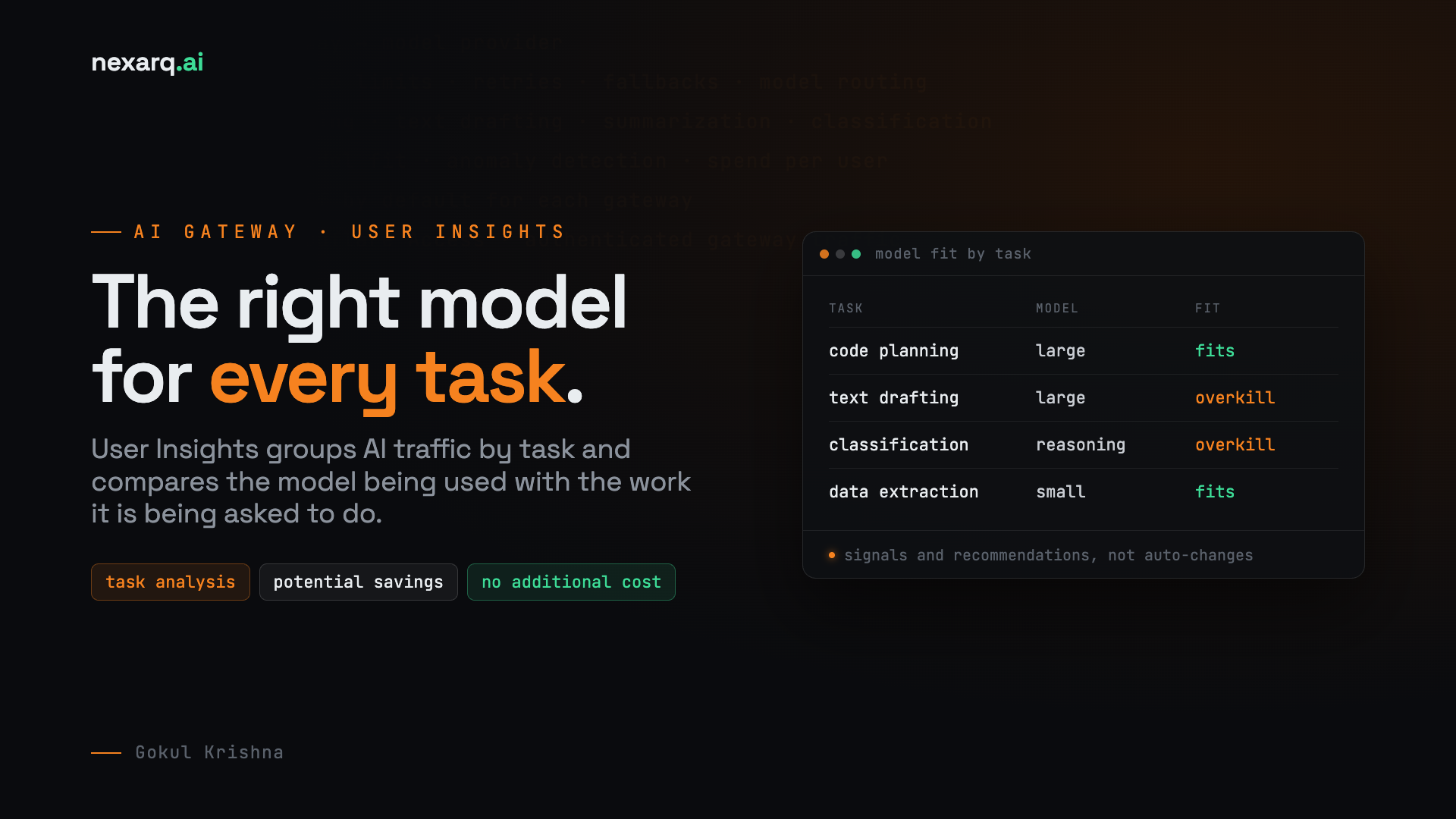
How task, model, identity, cost, latency, and conversation data turn AI traffic into testable routing decisions
AI bills rarely jump because of one spectacular request. They grow when an application sends routine work to an expensive model thousands of times.
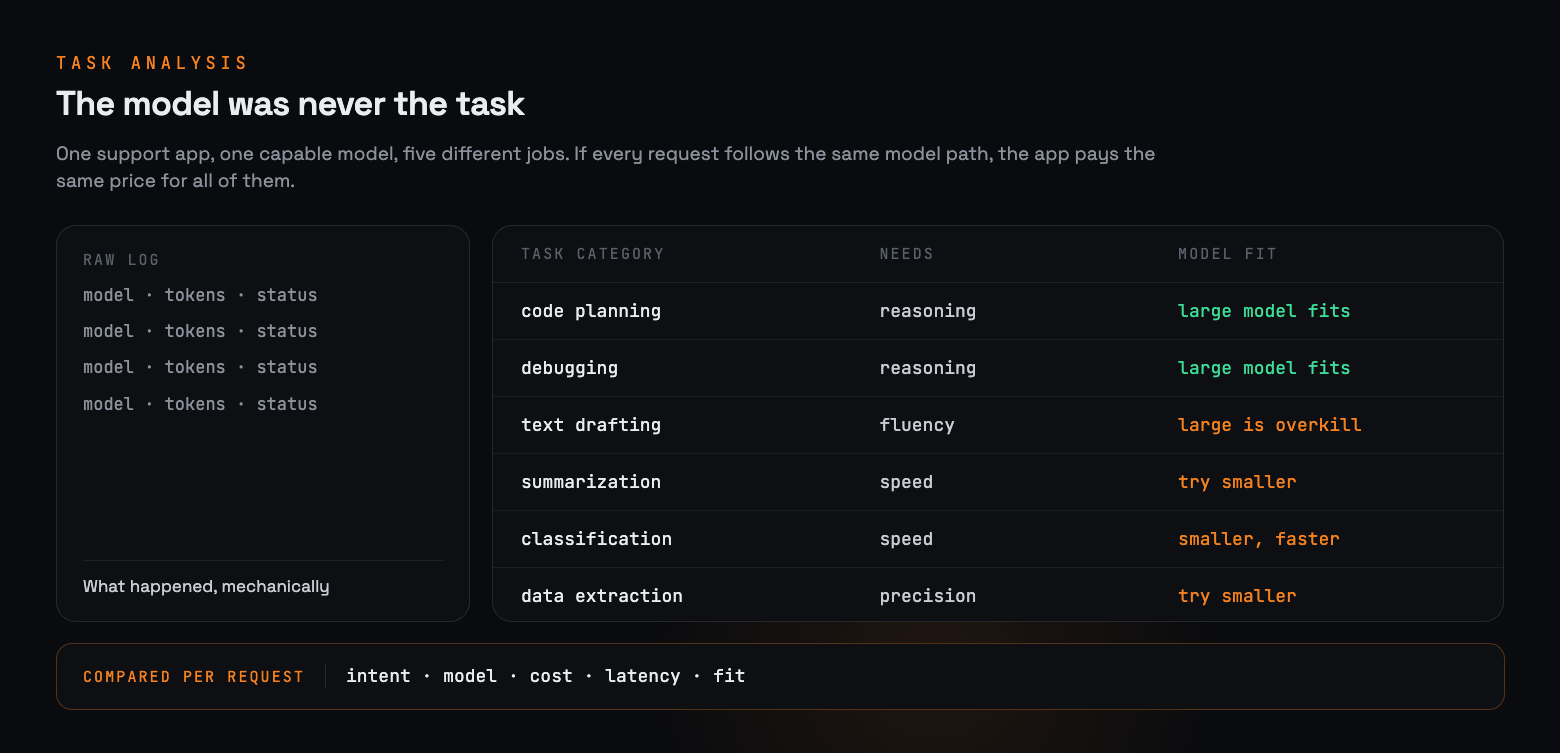
Consider a support assistant that uses one reasoning model for every step. The model answers difficult technical questions, but it also extracts order numbers, classifies tickets, rewrites short replies, and summarizes conversations. Request counts and token totals show that the system is busy. They do not show whether the model matches the work.
AI Gateway User Insights adds the missing context. It groups conversations by task, relates those tasks to model, identity, cost, latency, and conversation-turn data, and identifies cases where a model may be more capable than the task requires. Teams can then test a candidate model against a defined quality threshold before changing a route.
This post follows that process from raw gateway traffic to a measured routing decision. It also explains how classification runs, what User Insights stores, why results are delayed, and how identity and anomaly signals change the investigation.
Model names do not describe the workload
AI Gateway records the mechanical facts of a request: provider, model, tokens, cache status, errors, latency, and cost. Those fields answer what happened on the request path. They cannot distinguish a code review from a summary or explain why an agent made six calls to complete a simple task.
That distinction changes the decision. High spend may come from a growing workload, a default model applied too broadly, repeated agent calls, or one identity behaving differently from its usual pattern. Each cause requires a different response.
User Insights connects five views of the same traffic:
- Task: the kind of work represented by the conversation.
- Model fit: whether the selected model appears more capable than the task requires.
- Turns: the requests, responses, tool calls, and tool results needed to finish the work.
- Identity: the user, agent, team, or application associated with the traffic.
- Outcome measurements: cost, latency, token use, errors, and cache behavior.
The result is an investigation target. A model-fit signal does not prove that another model will preserve quality, and User Insights does not silently replace the model. The application owner still has to test the alternative.
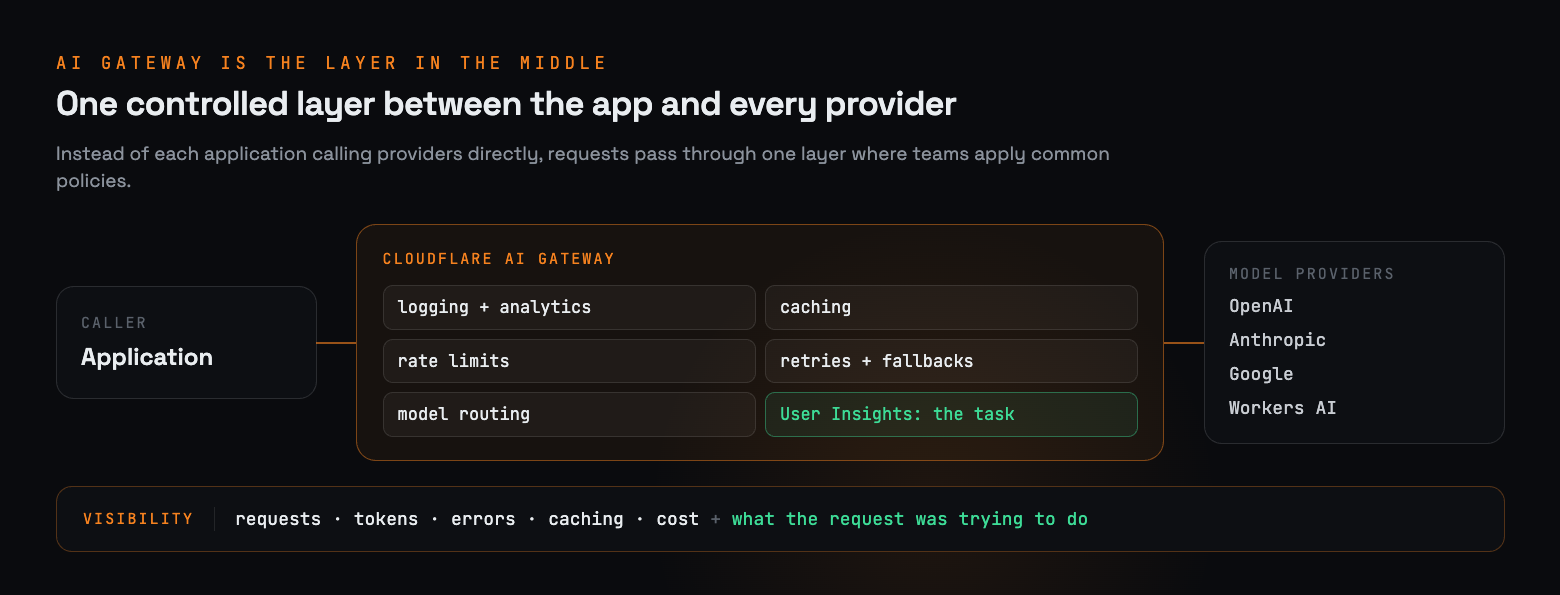
How task classification works
Cloudflare classifies eligible AI Gateway logs after the request has completed. A dedicated Cloudflare Worker examines the conversation trajectory, including user requests, assistant responses, tool calls, and tool results. It assigns a task category and returns a confidence score together with dimensions such as complexity, intent ambiguity, stakes, and context dependence.
Classification stays outside the request path, so it adds no latency to the response seen by the user. The tradeoff is reporting delay: newly received conversations may take approximately one day to appear after logs are processed and aggregated. User Insights is therefore suited to finding patterns over time rather than watching live traffic.
A worked model fit investigation
The following example is illustrative. Its numbers demonstrate the method and are not Cloudflare production results. Replace them with measurements from the workload before publishing a customer-specific claim.
Suppose the task view shows that short support-ticket summaries account for a large share of spend. The model view shows that the application sends every summary to a high-capability reasoning model, and the turns view shows that most summaries finish in one exchange. The team builds a fixed evaluation set from representative, approved conversations and tests a smaller candidate model.
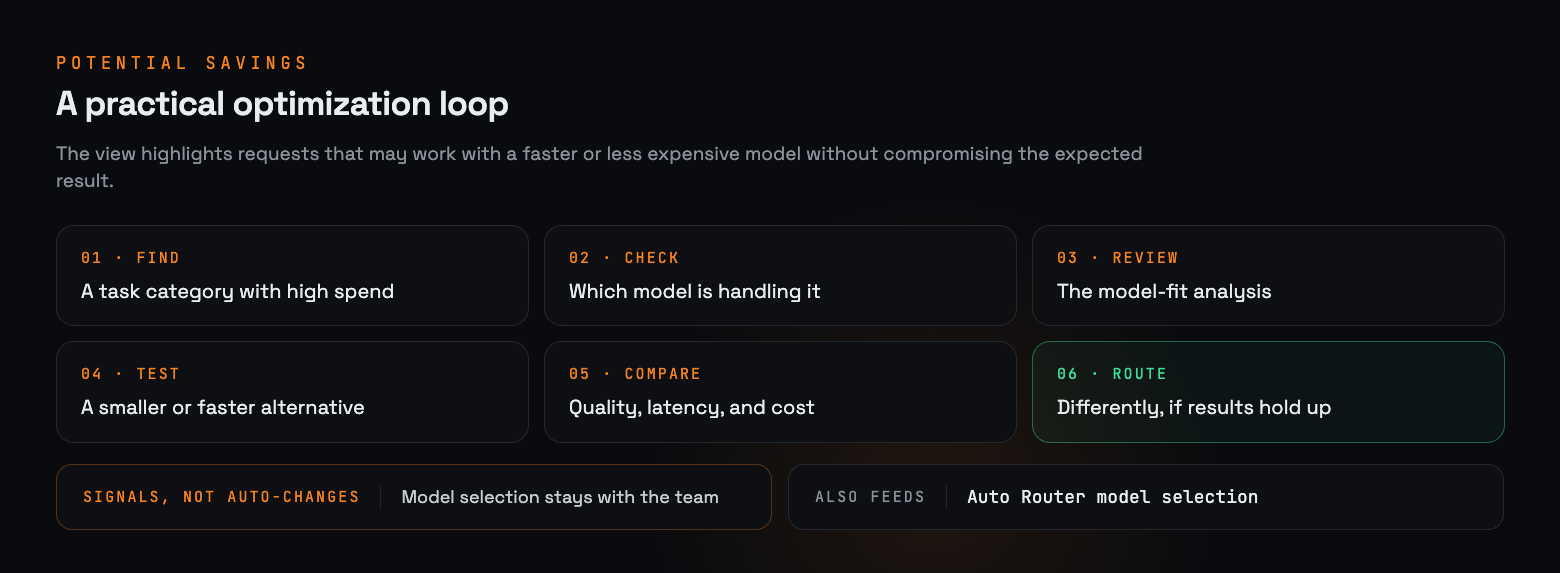
In this example, the candidate reduces p95 latency by 3.1 seconds and estimated cost by $14.70 per 1,000 completed tasks. Its quality pass rate is 0.3 percentage points below the baseline, which remains inside the predeclared 0.5-point tolerance. The team can proceed to a limited traffic test because the quality requirement was defined before the comparison.
The decision rule matters more than the apparent savings. Without a representative evaluation set and a tolerance chosen for the task, a lower cost is only a price difference.
```python
# Evaluation pattern; replace fields and thresholds with your own test data.
baseline = {"quality": 0.974, "p95_latency_s": 4.8, "cost_per_1k": 18.60}
candidate = {"quality": 0.971, "p95_latency_s": 1.7, "cost_per_1k": 3.90}
quality_tolerance = 0.005
quality_passes = candidate["quality"] >= baseline["quality"] - quality_tolerance
latency_improves = candidate["p95_latency_s"] < baseline["p95_latency_s"]
cost_improves = candidate["cost_per_1k"] < baseline["cost_per_1k"]
route_candidate = quality_passes and latency_improves and cost_improves
```
Identity turns a pattern into an owner
A task-level pattern is easier to act on when the team can trace it to a user, agent, or application. Without identity or custom metadata, User Insights groups usage under an anonymous identifier. Teams can add a stable user identifier in custom metadata or place the gateway behind Cloudflare Access so authenticated requests carry a verified identity.
For custom applications, include stable, non-sensitive user and session identifiers. Keep identity data out of the prompt itself. A representative request looks like this:
```http
POST https://gateway.ai.cloudflare.com/v1/$ACCOUNT_ID/$GATEWAY_ID/openai/chat/completions
Content-Type: application/json
Authorization: Bearer $OPENAI_API_KEY
cf-aig-metadata: {
"user_id": "user-123",
"session_id": "session-456",
"idp_group": "support",
"application": "ticket-summary"
}
}
{
"model": "$MODEL",
"messages": [{"role": "user", "content": "Summarize this support ticket."}]
}
```
Stable identifiers let the dashboard answer narrower questions: which application sends summaries to the reasoning model, whether the behavior belongs to one agent version, and whether the routing change should apply to one workflow or the entire gateway.
## Anomaly detection separates spikes from changed behavior
Cost spikes require a different test. User Insights builds a rolling baseline for each identity using the p95 session cost over the previous 30 days. It flags a session only when both conditions are true: the session costs more than twice the user’s own p95, and it exceeds the organization-wide p99 session cost.
Requiring both thresholds reduces two common false alarms. A small increase from a low-usage user may exceed that person’s normal value while remaining financially insignificant. A routinely expensive session from a heavy user may exceed the organization threshold without being unusual for that identity. The combined rule looks for sessions that are unusual at both levels.
A flag does not block the request. It gives the team a session to inspect for a compromised credential, a broken retry loop, a changed prompt, or an agent making more calls than usual.
Turns reveal the cost of completing a task
A request-level view can hide the cost of agent behavior. One task may finish with a single response, while another requires corrections, retries, and tool calls. Turns analysis measures the path to completion instead of treating every request as an independent event.
A long conversation may be appropriate for research or debugging. Repeated turns on a simple classification task deserve investigation. The model may misunderstand the prompt, the agent may lack a stopping condition, or a tool may be returning data that forces retries.
For each candidate workload, compare completed tasks rather than isolated requests. Track the number of turns, total input and output tokens, wall-clock latency, error rate, and cost from the first request through the final accepted result.
Privacy and retention remain part of the design
Classification examines eligible request and response content, so teams should review logging before enabling it. Decide which payloads may be stored, how long log bodies are retained, who can inspect them, and whether sensitive fields require filtering.
Cloudflare’s published implementation stores metadata separately from log bodies. User Insights exposes derived categories and aggregate views, while retention of underlying log bodies follows the gateway’s configured logging behavior.Stable identity fields should be non-sensitive identifiers rather than names, email addresses, or personal data copied into prompts.
The decision can differ by application. A team may classify an internal coding assistant while excluding a workflow that handles regulated records. Record that choice with the routing and identity configuration so later operators understand why two gateways produce different insight coverage.
A repeatable path from insight to route
A safe model change follows a short sequence:
1. Choose a task with material spend, latency, or turn count.
2. Trace the pattern to the users, agents, and applications that produce it.
3. Build a representative evaluation set and define the quality tolerance before testing.
4. Compare candidate models on completed-task quality, p95 latency, tokens, turns, errors, and cost.
5. Send a limited share of production traffic to the candidate and watch for distribution changes.
6. Expand the route only while the quality threshold continues to hold.
Auto Router can apply task, complexity, conversation-trajectory, and model-fit signals when choosing among available models. The same quality discipline still applies: the application team should define what an acceptable result means and monitor whether the route continues to meet that standard.
Choose models with evidence
AI Gateway User Insights connects model usage to the work behind it. Task categories show what the traffic represents. Turn data shows what it takes to finish. Identity points to the owner. Cost and latency quantify the effect. Classification and anomaly signals identify workloads that deserve a closer look.
Start with one repeated task. Measure its current quality, latency, turns, and cost. Test an alternative against a fixed threshold, route a small share of traffic, and keep measuring. That process produces a model choice the team can explain and revisit as the workload changes.

No comments yet