How Cloudflare's cf turns API schemas into more than 2,900 commands
Cloudflare's new cf CLI brings public API resources and Workers development into one interface. Nexarq examines how schema generation, weighted local search, typed configuration, and Wrangler migration work.
Adding a DNS record and deploying a Worker should not require two command-line tools and a trip to the dashboard. Until now, that was often the practical result of how Cloudflare's developer tools grew. Wrangler focused on Workers projects, while account resources lived behind product APIs, dashboard screens, and one-off scripts.
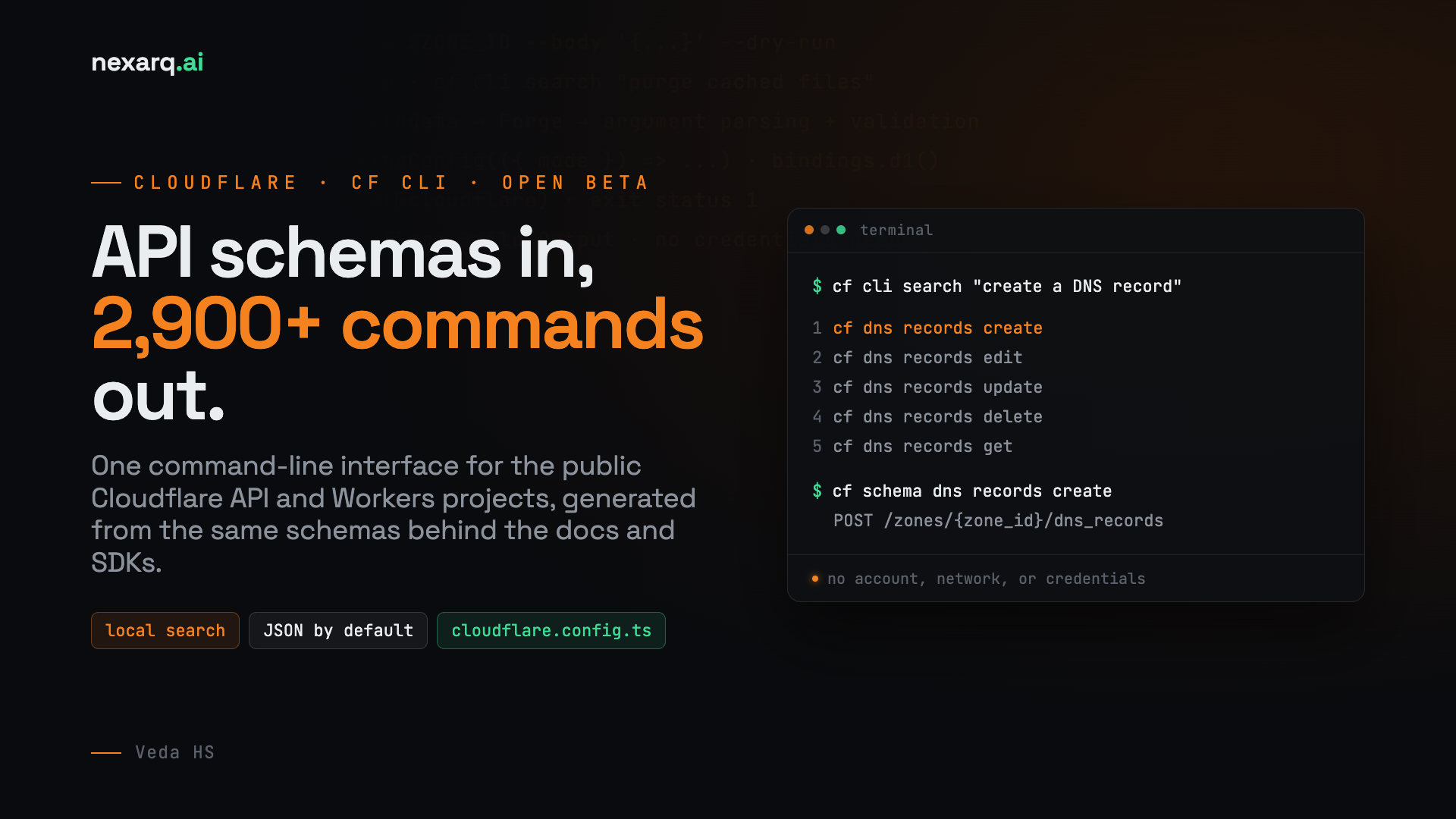
Cloudflare launched the open beta of cf on September 28, 2026 to give those tasks one command-line interface. cf covers the public Cloudflare API and Workers projects. It currently exposes more than 2,900 commands, uses TypeScript for project configuration, and returns JSON from generated API commands by default.
At Nexarq, we work with teams that need repeatable ways to manage Workers and account resources. As a Cloudflare partner, we tested the beta to understand more than its command syntax: how Cloudflare generates thousands of commands, how local search makes them discoverable, and what teams should check before using cf in an existing project or CI pipeline.
Why Cloudflare built a new CLI
Wrangler grew around Workers. Product teams added commands as Workers gained bindings, deployment controls, logs, storage integrations, and other capabilities. That work made Wrangler a useful project tool, but it did not produce a common interface for the rest of Cloudflare.
By the time Cloudflare began work on cf, Wrangler had about 280 command paths while the Cloudflare API had more than 3,000 operations. Adding those operations to Wrangler one product at a time would have taken years. It also would have preserved command differences that had accumulated over time:
Task
Wrangler command
Inspect a D1 database
wrangler d1 info
Inspect a Hyperdrive configuration
wrangler hyperdrive get
Inspect a Workflow
wrangler workflows describe
Each command asks for the same kind of operation, but each product chose a different verb. Applying that pattern to thousands of API operations would make commands harder to predict and harder for coding agents to discover.
Usage had changed too. In its launch announcement, Cloudflare reported that coding agents accounted for 48 percent of Wrangler usage during the preceding week. Those agents used almost twice as many distinct commands per day as other users and were nearly four times as likely to run six or more commands. A CLI designed for that usage pattern needs predictable commands, machine-readable results, and a way to discover capabilities without loading thousands of command descriptions into context.
cf is available as an open beta, and its commands, configuration, and Build Output format can change before the stable release.
How an API operation becomes a command
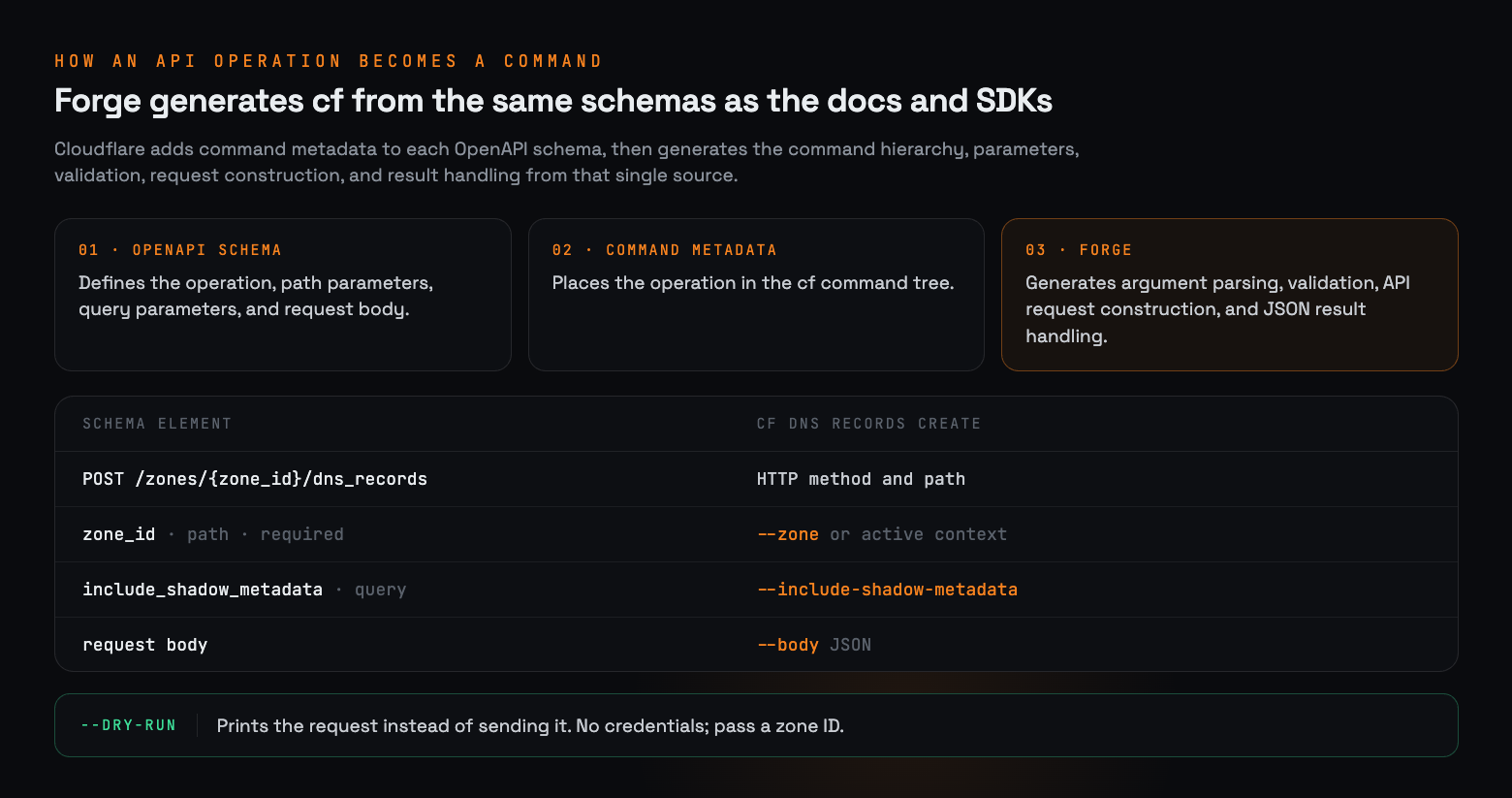
Most cf resource commands come from Forge, Cloudflare's API generation pipeline. Forge already uses API schemas to support Cloudflare's documentation and SDKs. For cf, Cloudflare adds command metadata to those schemas and generates the command hierarchy, parameters, validation, request construction, and result handling from the same source.
An API operation reaches the terminal through three steps:
1. An OpenAPI schema defines the operation, path parameters, query parameters, and request body.
2. Cloudflare adds the metadata needed to place the operation in the cf command tree.
3. Forge generates argument parsing, validation, API request construction, and JSON result handling.
Generation removes repetitive code, but it does not remove design work. Product terminology still needs review. Some operations accept large request bodies that do not map cleanly to named flags. Destructive commands need confirmation behavior. Pagination, account selection, and zone selection need consistent rules across products.
The DNS record creation API provides a useful example. Its schema defines a POST request to /zones/{zone_id}/dns_records, a required zone path parameter, an optional query parameter, and a request body. In cf, that operation becomes cf dns records create.
cf schema exposes the mapping without making an API request. The output below was captured from cf version 1.0.0-beta.6 on October 1, 2026 and shortened to the relevant fields:
A dry run does not send an API request and does not need credentials. For zone-scoped dry runs, use a zone ID because cf does not resolve a domain name while constructing the preview. The resource command guide walks through the full request and response.
Finding one command among thousands
Generating thousands of commands creates a discovery problem. A conventional --help tree works when users know the product and operation name, but it is less useful when they start with a task such as creating a DNS record or purging cached files.
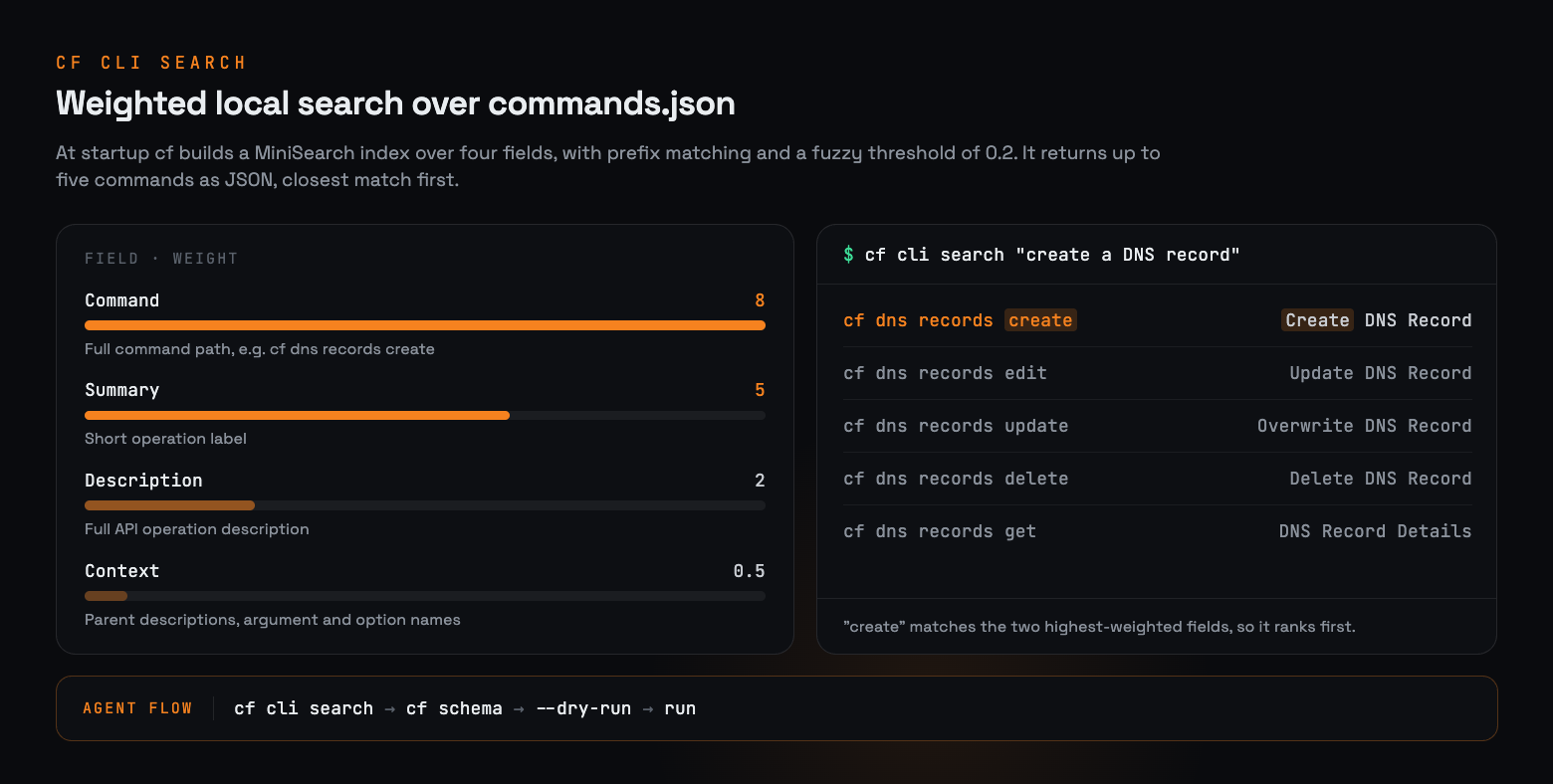
cf cli search accepts a plain-language description and searches a local index. It returns up to five possible commands as JSON, with the closest match first. The search does not need an account, network access, or credentials.
BASH
cf cli search "create a DNS record"
In version 1.0.0-beta.6, captured on October 1, 2026, that query returns five candidates:
JSON
[
{
"command": "cf dns records create",
"summary": "Create DNS Record"
},
{
"command": "cf dns records edit",
"summary": "Update DNS Record"
},
{
"command": "cf dns records update",
"summary": "Overwrite DNS Record"
},
{
"command": "cf dns records delete",
"summary": "Delete DNS Record"
},
{
"command": "cf dns records get",
"summary": "DNS Record Details"
}
]
The search is lexical and runs against commands.json, a metadata file bundled with cf. At startup, cf builds a MiniSearch index over four fields. Each field carries a different ranking weight:
Indexed field
Weight
Contents
Command
8
The complete command path, such as cf dns records create
Summary
5
The short operation label
Description
2
The full API operation description
Context
0.5
Parent descriptions plus argument and option names and descriptions
Search enables prefix matching and a fuzzy-match threshold of 0.2, then returns the first five results. The weighting explains why cf dns records create ranks above related edit, update, delete, and get operations for this query. The word create appears in its command path and summary, the two fields with the highest weights.
Root and command-group help also directs coding agents to search before inspecting nested help. The guidance tells agents to describe the action and resource type without including domains, account IDs, tokens, or other identifying values. Because search runs locally, the query remains on the machine.
After choosing a result, cf schema shows the method, path, parameters, and body fields for a generated API command:
BASH
cf schema dns records create
cf dns records create --help
Search limits the candidate commands before schema inspection and dry-run output expose their exact inputs. A person can review the request, while an agent can consume each step as JSON without loading the full command tree into context.
Generated API commands print their results as JSON on standard output. Progress and diagnostic messages use standard error. Scripts can therefore send the result to jq or another process without first removing terminal formatting.
BASH
cf dns records list --zone  example.com  --type A \
| jq -r '.[] | "\(.name) \(.content)"'
Typed configuration for Workers projects
Workers projects use cloudflare.config.ts. TypeScript lets the editor and language server describe bindings, triggers, and configuration fields while the author edits the file. It also allows teams to construct configuration from shared functions instead of copying environment blocks.
TYPESCRIPT
import { bindings, defineConfig } from "cf/config";
The explicit fallback matters because modes are not identical across build paths. The Cloudflare Vite plugin uses development for cf dev and production for builds. Commands delegated to Wrangler can leave the mode undefined, so the configuration chooses a default instead of producing a resource name such as orders-undefined.
cf does not contain its own bundler or development server. Project commands hand work to the detected framework, the Cloudflare Vite plugin, or Wrangler. A new project created with cf init uses the Vite path by default. Projects that still need Wrangler's build path can continue to use it through cf.
BASH
cf init demo-worker
cd demo-worker
cf dev
cf deploy --dry-run
cf deploy
cf deploy --dry-run builds the project and validates Cloudflare Build Output without uploading it. It does not require credentials. One detail matters in automation: if the directory has no cloudflare.config.ts, automatic project configuration can still install packages and write files before the dry run. Run cf init . locally, review the changes, and commit the configuration before adding the command to CI.
Migrating a Wrangler project safely
Resource commands can run beside an existing Wrangler project. Project commands are different. cf dev, cf build, and cf deploy expect cloudflare.config.ts. If a repository contains only wrangler.jsonc, wrangler.json, or wrangler.toml, a project command can create configuration that ignores the Wrangler file or can stop with an error.
Preview the conversion before changing the project:
BASH
cf migrate --dry-run
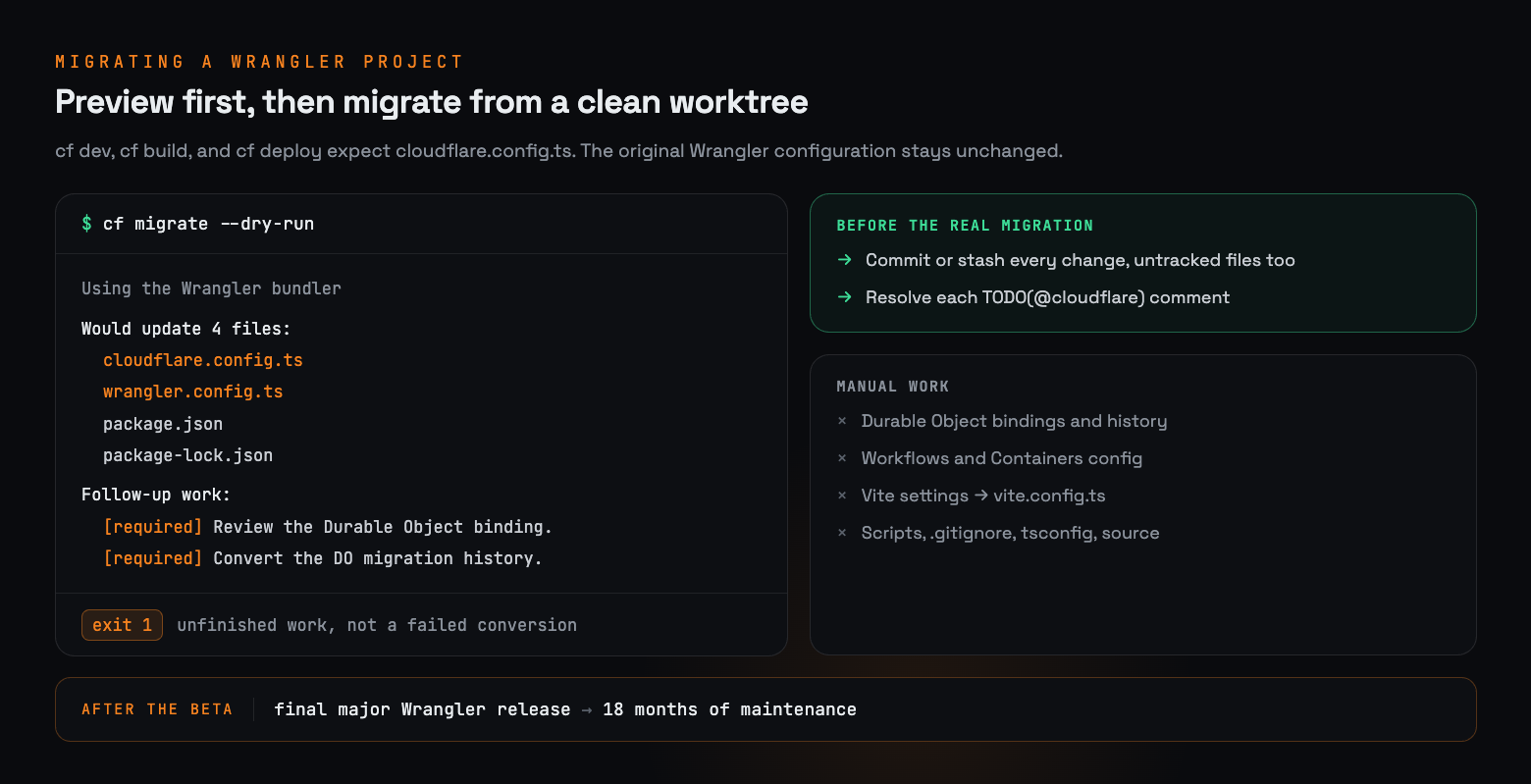
The preview lists the files cf would write and any follow-up work. It does not show a full diff, and it can run while the Git worktree contains changes.
Our recommendation for existing projects is to treat migration like any other configuration change. Before the real migration, commit or stash every change, including untracked files. The migration can create cloudflare.config.ts and add cf to the project. When the project continues to use Wrangler as its bundler, it can also create wrangler.config.ts. The original Wrangler configuration remains unchanged.
For a Worker with Durable Objects, an abridged preview can look like this:
TEXT
Using the Wrangler bundler because @cloudflare/vite-plugin is not declared. Would update 4 files: cloudflare.config.ts wrangler.config.ts package.json package-lock.json
Follow-up work: [required] Review the Durable Object binding. [required] Convert the Durable Object migration history.
Migration requires follow-up work.
The dry run exits with status 1 while required items remain. That status indicates unfinished migration work, not necessarily a failed conversion.
Migration does not mean every project is ready immediately. Durable Object bindings require review, and Durable Object migration history needs manual conversion. Workflows and Containers configuration also require manual work. Vite projects may need build settings moved into vite.config.ts. Package scripts, .gitignore, tsconfig.json, and application source remain the developer's responsibility.
Required follow-up items appear as TODO(@cloudflare) comments in the generated configuration. cf also adds a thrown error so that project commands fail until those items are resolved. The Wrangler migration guide documents each case and includes a complete example.
Cloudflare says that when the open beta ends, it plans one final major Wrangler release that points users toward cf, followed by 18 months of Wrangler maintenance. Teams do not need to force every project onto the new configuration during the beta.
Safe use in scripts and CI
Broad API coverage means a single executable can change many kinds of resources. Use the same controls you would apply to a direct API client:
• Test new commands in a non-production account or resource.
• Use a narrowly scoped API token for unattended work.
• Inspect cf schema, command help, and dry-run output before adding --force.
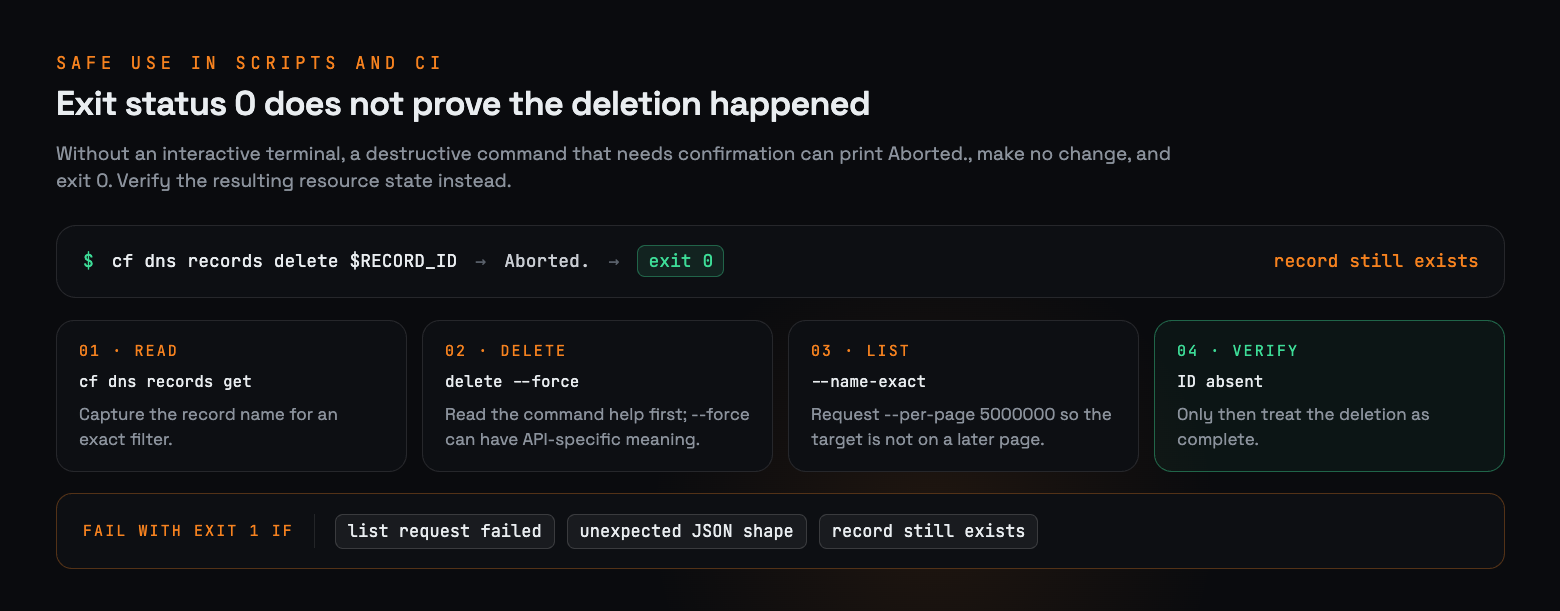
• Check the resulting resource state after a destructive operation.
The last point covers a behavior that can surprise scripts. When a destructive command requires confirmation but runs without an interactive terminal, it can print Aborted., make no change, and exit with status 0. A zero exit code therefore does not prove that the requested deletion happened. Some commands also give --force API-specific meaning beyond confirmation, so read the command help before using it in CI.
For a DNS deletion, first capture the record name so the verification query can use an exact server-side filter. The script should then distinguish three outcomes: the list request failed, the response had an unexpected shape, or the record still exists.
BASH
if ! record_json="$(cf dns records get "$RECORD_ID" --zone "$ZONE_ID")"; then
echo "Could not read the DNS record before deletion" >&2
exit 1
fi

if ! record_name="$(jq -er '.name | select(type == "string")' <<<"$record_json")"; then
echo "DNS record response did not contain a name" >&2
exit 1
fi

cf dns records delete "$RECORD_ID" --zone "$ZONE_ID" --force

if ! records_json="$(cf dns records list \
--zone "$ZONE_ID" \
--name-exact "$record_name" \
--per-page 5000000)"; then
echo "Could not verify DNS record deletion" >&2
exit 1
fi

if ! jq -e 'type == "array"' >/dev/null <<<"$records_json"; then
echo "DNS record list returned unexpected JSON" >&2
exit 1
fi

if jq -e --arg id "$RECORD_ID" \
'any(.[]; .id == $id)' >/dev/null <<<"$records_json"; then
echo "DNS record still exists after deletion" >&2
exit 1
fi
--name-exact limits the verification query to records with the same name. The current DNS records API allows up to 5,000,000 results per page, so the example requests that maximum to avoid missing the target on a later page. Only after the list request succeeds, the response has the expected shape, and the record ID is absent does the script treat the deletion as complete. This verifies the intended postcondition instead of treating process status as proof that the API changed the resource.
What to try during the beta
Install the CLI with Node.js 22.18 or later. cf keeps credentials separately from Wrangler, so complete its sign-in flow even if Wrangler already works on the machine.
Then choose one low-risk task. Search for a command, inspect its schema, and preview the request. For Workers, create a small test project or migrate a non-production project with a clean Git worktree.
Our conclusion at Nexarq is that the strongest reason to test cf now is not simply its breadth. It is the chance to replace product-specific command habits with an interface that can be searched, inspected, and checked before it changes a resource. Start with a low-risk task, keep existing Wrangler projects stable, and treat migration as a reviewed engineering change rather than a required upgrade.
Cloudflare is using the beta to refine commands, configuration, and Build Output based on real use. Reports from projects with unusual build steps, large Wrangler configurations, or API operations that do not map cleanly to generated commands are particularly useful. Issues can be filed in the cf GitHub repository.


No comments yet