Clientless Remote Browser Isolation: Access Without Installing a VPN or Agent
How to give contractors, BYOD users, and third parties access to internal web applications without asking them to install anything, and what you can actually control once you do
When we talk about securing access to internal applications, the first thing that usually comes to mind is installing a client on the user’s device.
That works well when the device belongs to the organization and is managed by the IT team. But what happens when it doesn’t?
Think about a contractor using their personal laptop, an employee working from a BYOD device, or an external team that needs access to an internal application for a few weeks. In these situations, asking everyone to install a VPN or security agent isn’t always practical.
This is where clientless access becomes useful. And when you combine it with Remote Browser Isolation, you get an interesting way of providing access to web applications without requiring an agent on the user’s device.
I recently spent some time understanding how the two work together. What I found interesting is that the user still gets the experience of using a normal web application, while the actual browser session is handled somewhere else entirely.
So let’s break down how this works.
First, what do we mean by clientless access?
The name is fairly literal.
With clientless access, the user does not install the Cloudflare One Client or WARP on their device. They open a browser, go to the application, and authenticate using the organization’s identity provider. Depending on the setup, that could be Google, Okta, Microsoft Entra ID, or another supported provider.
Once the user is authenticated and the Access policy allows them, they can use the application directly from their browser.
This is useful when the device isn’t managed by the organization, or when installing an agent simply isn’t an option.
But there’s an important point here.
Clientless access by itself does not mean the application is isolated from the user’s device. The application can still render in the user’s local browser.
That’s where Remote Browser Isolation comes in.
So what does Remote Browser Isolation actually do?
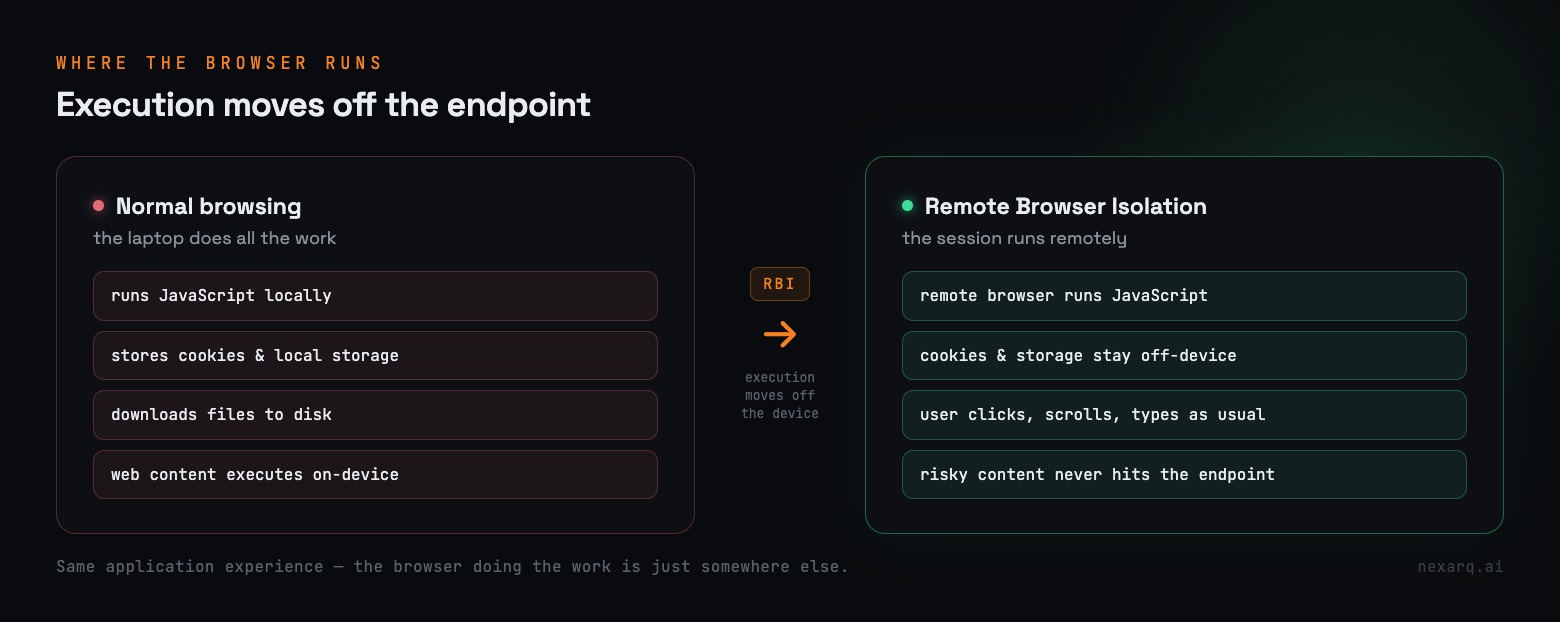
Normally, when you open a website, the browser on your laptop does the work. It downloads the content, runs JavaScript, stores cookies, uses local storage, and handles everything required to display and interact with the application.
With Remote Browser Isolation, that activity moves away from the local device. The browsing session runs remotely, and the user interacts with it from their own browser.
A simple way to think about it: the user is still using the application, but the browser doing the actual work is running somewhere else.
The user can click, scroll, type, and interact normally. The web content itself is handled in the remote browser environment.
This becomes especially useful when the device can’t be fully trusted.
Where does clientless RBI come in?
Clientless RBI brings the two ideas together.
The user doesn’t install WARP or any other client. They use a normal browser to authenticate and reach the application. At the same time, the browser session is isolated remotely.
That gives security teams an option for situations where they want to provide access to a web application without requiring software on the endpoint or full trust in it.
The user experience stays simple:
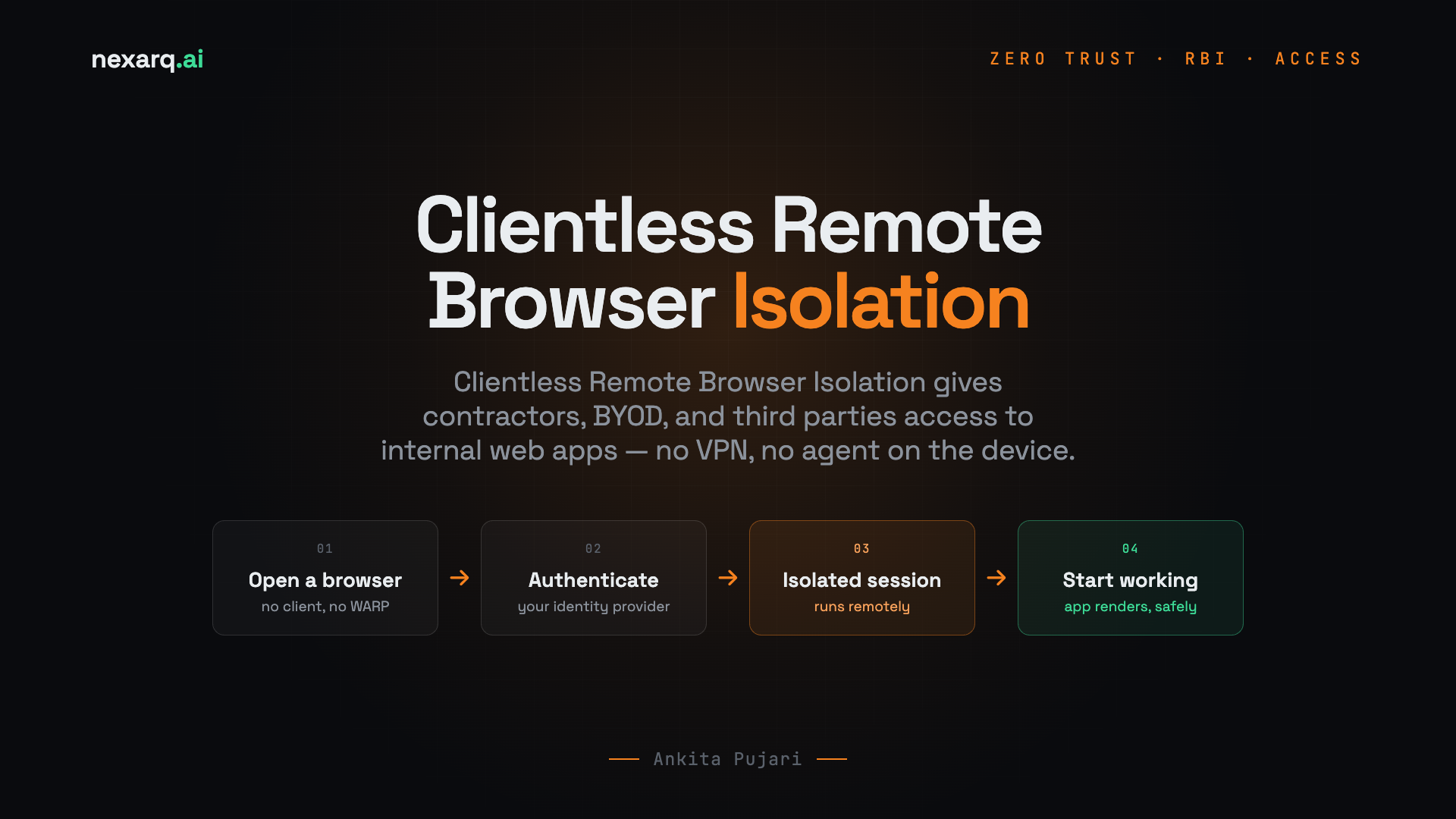
Open a browser -> Authenticate -> Open the application -> Start working
From the user’s point of view, it may not feel very different from any other web application. The difference is what happens behind the scenes.
What happens when a user accesses an application?
This is the part I found most useful to understand, because it explains where the application actually runs.
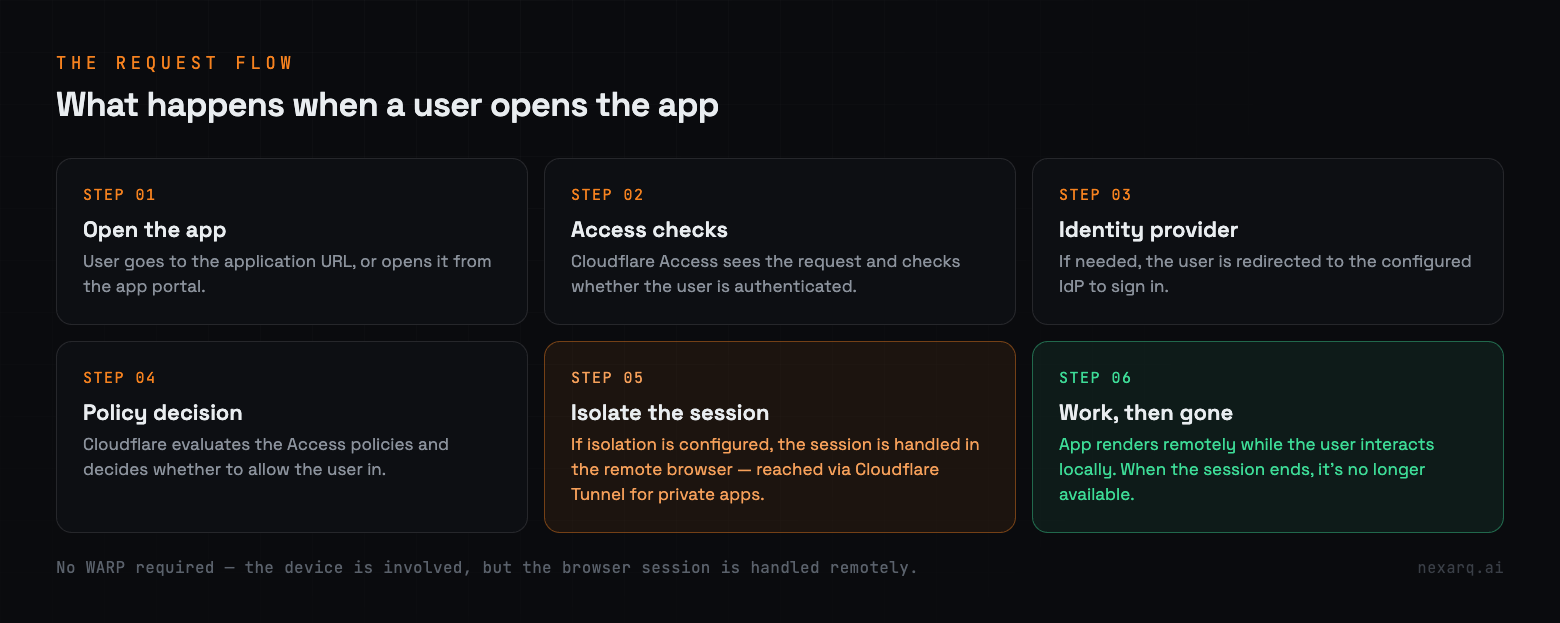
Say a user wants to reach an internal dashboard published through Cloudflare Access. The flow looks something like this:
The user opens a browser and goes to the application URL, or opens it from the application portal.
Cloudflare Access receives the request and checks whether the user is authenticated.
If authentication is required, the user is redirected to the configured identity provider.
After successful authentication, Cloudflare checks the Access policies and decides whether the user is allowed in.
If the application is configured to use browser isolation, the session is handled through the remote browser environment.
The remote browser connects to the application through the configured connectivity path, such as Cloudflare Tunnel, if the application sits inside a private network.
The application renders remotely while the user interacts with it from their local browser.
When the session ends, the remote browser session is no longer available to the user.
The important thing here is that the user doesn’t need WARP installed just to access the application. Their device is still involved in the interaction, but the browser session itself is handled remotely.
Three ways you can look at the setup
There are a few different ways clientless access and RBI can be combined, depending on what you’re trying to protect.
1. Clientless access without isolation
The simplest approach is to publish an internal application through Cloudflare Access and let users reach it through a browser. The user authenticates, the Access policy allows them, and they use the application.
This works when the user doesn’t have WARP installed but the device is still considered acceptable for that application.
The downside is that the application still runs in the user’s local browser. If the device is unmanaged, you don’t have the same level of control you would have with a managed one.
2. Clientless access with browser isolation
This is where things get more interesting.
The user still reaches the application without installing WARP, but the browser session is isolated remotely. That’s useful for contractors, third-party users, or anyone working from a personal device.
Imagine a contractor who needs access to an internal ticketing application for a few weeks. Instead of asking them to install a security client on their personal laptop, you provide access through the browser and apply isolation controls to the session.
They get their work done, and the organization has more control over how that session interacts with the local device.
3. Always isolate certain applications
Another option is to identify the applications that need an extra layer of protection and configure those specifically to use isolation.
You might want stronger controls on an internal admin portal, or on an application holding sensitive customer information.
In this case the user doesn’t have to remember a different URL or follow a special process. They access the application normally, and the isolation policy is applied in the background.
This works well when only a small number of applications need that level of protection.
Where would I actually use this?
The use cases are probably the easiest way to see where clientless RBI fits.
Contractors and third-party users
This is the first scenario that comes to mind for most people.
You have contractors who need access to an internal application, but they’re using their own devices. You probably don’t want to install EDR or other security software on a personal laptop, and you may have no visibility into the security posture of that device.
They still need to get their work done.
Clientless access combined with RBI gives them the web application they need without requiring the device to be managed like a corporate laptop.
BYOD and executive access
BYOD creates a similar problem.
An executive might need to check a dashboard from a personal tablet. Someone else might need temporary access while travelling.
In these cases you probably don’t want to put the user through a full VPN or WARP deployment just to open one web application. Clientless access makes that much simpler from their side, and if isolation is applied, the organization gets another layer of protection around the session.
Protecting users from risky web content
Browser-based attacks are a constant concern for security teams. Users visit websites every day, click links, download files, and interact with content from sources that aren’t always trustworthy.
With RBI, browser execution moves away from the endpoint, so potentially risky content is handled in the isolated environment instead of directly on the user’s device.
This doesn’t mean RBI replaces endpoint security or patching. It doesn’t. Think of it as another layer that reduces the endpoint’s exposure to certain kinds of web-based threats.
Compliance and sensitive applications
There are also cases where organizations need more control over how users interact with sensitive applications.
A company working with financial or healthcare data may want to limit downloads, clipboard operations, or printing for certain users. Instead of giving unrestricted access to everything, isolation policies can control what a user is allowed to do during the session.
The exact requirements always depend on the organization’s compliance obligations, but this can be one part of a broader strategy.
What can you control?
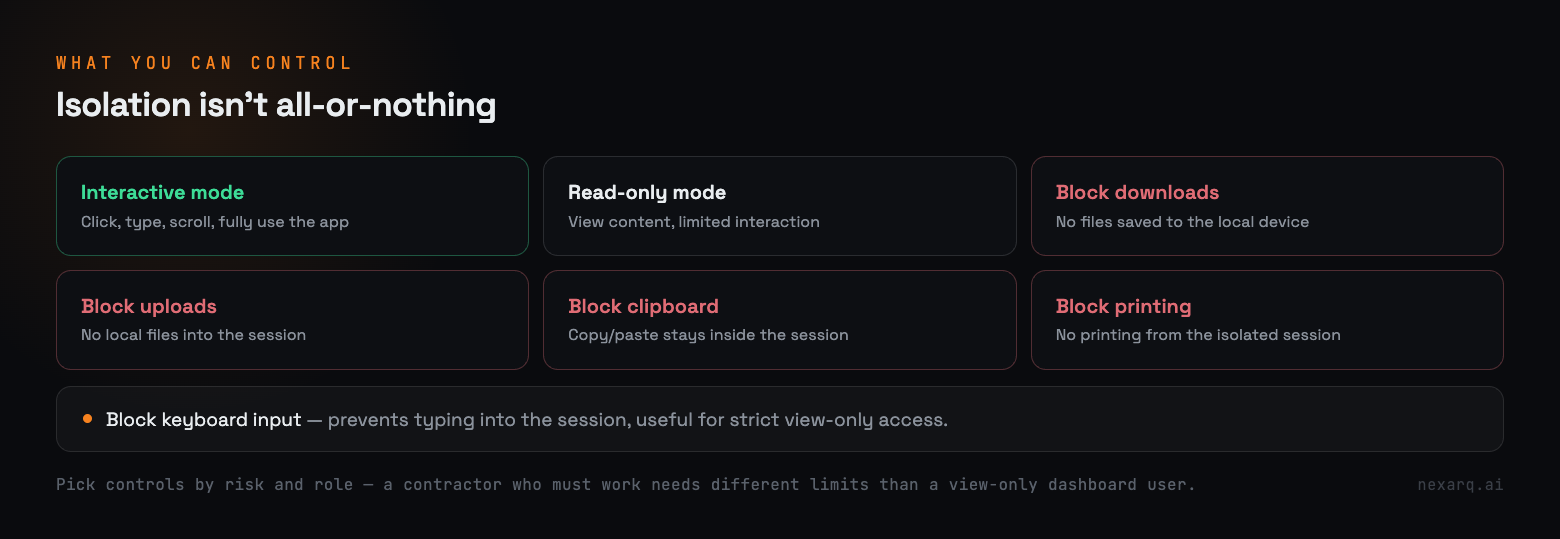
One thing I like about the RBI approach is that it doesn’t have to be an all-or-nothing decision. Depending on the requirement, you can apply different controls to the isolated session.
some of the key controls available during an isolated browser session. Depending on the policy, users can be given full interactive access or restricted to a read-only experience. Organizations can also prevent actions such as downloading files, uploading local content, copying and pasting data between the isolated session and the local device, printing, or entering keyboard input. These controls help reduce the risk of data leakage while still allowing users to access the applications they need.
The right settings depend on the user.
If a contractor needs to work inside an application, you probably can’t make the session completely read-only. They need to interact with it. But you might still block downloads and clipboard operations.
For someone who only needs to view a dashboard, you can apply much stricter controls.
This is where the policy matters. You choose the controls based on the risk and the type of access required.
One useful detail: copy and paste can also be restricted to work only within the isolated browser, so users can move text around inside the session but not out to their local clipboard.
Where does it work well?
Clientless RBI makes the most sense when the application is web-based. Common examples:
Internal dashboards
Web-based admin portals
Ticketing applications
Internal business applications
Web-based SaaS applications
Anything accessed over HTTP or HTTPS
If the user’s requirement is simply to open a browser and use a web application, this approach works well.
But it isn’t a solution for every type of application. It isn’t meant to replace direct access methods such as:
SSH
RDP
Direct database connections
Native applications that can’t run in a browser
Performance is another consideration. A normal business application or admin portal usually works without any noticeable problem. Applications that lean heavily on video, complex animations, or graphics may not feel the same as running them locally.
So test the actual application before rolling isolation out to everyone.
The bigger picture: do we always need to trust the device?
For me, this is the part that makes clientless RBI interesting from a Zero Trust perspective.
A traditional security approach usually starts with the device:
Is the device managed?
Does it have the required security software?
Is it patched?
Does it meet the company’s security requirements?
All of those questions still matter. But there are situations where you simply cannot control the device.
A contractor may be using a personal laptop. An executive may be using an iPad. A third-party user may be working from a shared system.
In those cases, instead of trying to make every device trusted, you can reduce how much trust the application needs to place in the device at all.
That’s where clientless access and RBI help. The organization authenticates the user, applies access policies, and isolates the browser session without requiring the endpoint to be fully managed.
This doesn’t make the endpoint irrelevant. It just means that, for certain web applications, you can lower the amount of trust you place in it.
That’s a genuinely useful idea in a Zero Trust architecture.
Final thoughts
Clientless Remote Browser Isolation isn’t going to replace every VPN, every WARP deployment, or every endpoint security product.
But it solves a specific problem well.
What do you do when someone needs access to a web application, and you don’t want to depend entirely on the security of the device they’re using?
For web-based applications, clientless access combined with RBI gives you another option. The user opens a browser, authenticates, and works, without installing an agent. The organization applies isolation and other controls to reduce the risk that the endpoint brings with it.
For contractors, third-party users, BYOD scenarios, and temporary access, that’s a practical approach.
The important thing is not to treat clientless RBI as something you apply everywhere. Look at the application, understand what the user actually needs to do, and then decide whether clientless access, WARP, or another method makes the most sense.
In the end, the goal of Zero Trust isn’t to make every device trusted. It’s to make sure users get only the access they need, under the right conditions, with the right controls in place.
For certain web applications, clientless RBI is one way to get there
Sources: Cloudflare documentation on Clientless Web Isolation, Isolation Policies, and Isolating a Self-Hosted Application. The explanations of browser isolation modes, policy controls, access restrictions, and deployment workflows are based on Cloudflare's official documentation for Remote Browser Isolation (RBI) and Zero Trust Access.


No comments yet